
ONE CHANGE. THE SAME ROOM.
AI Photo Editing Prompts: Change One Part of Your Room
You like the room, but want a different floor, wall color or sofa fabric. Write the change precisely, name what must stay, and check the result against your original photo before making another edit.
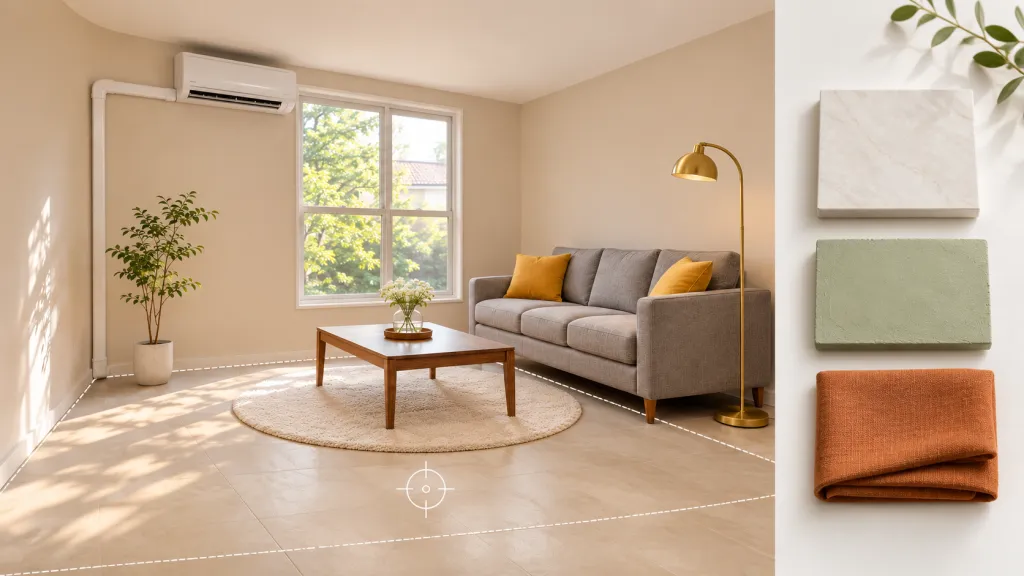
Start with the image you want to preserve
AI photo editing prompts work best when the starting image, target and limits are unambiguous. Upload the original room photo or the last version you approved. Ask for one change at a time. “Make this room modern” invites a full redesign; “replace only the visible oak flooring with matte white tile” identifies one surface. A preservation instruction can reduce drift, but it cannot guarantee that every untouched pixel stays identical.
A useful structure for AI photo editing prompts
Write three short parts: the target, the replacement and the preservation list. Name objects by location when there are several similar ones. “The sofa on the right” is clearer than “the furniture.” Keep the reference image attached to the request.
- 01
Where is the change?
Identify one visible surface or object: exposed floor, painted wall surfaces, sofa upholstery or the pipe cover in the left corner. Exclude neighboring objects explicitly.
- 02
What should replace it?
Specify material, finish and color. Add scale when it matters: matte 24-inch tile, narrow oak boards or a linen weave. Avoid conflicting instructions such as mirror-polished matte stone.
- 03
What must remain?
Name the room geometry, doors and windows, furniture positions, lighting, camera angle and crop. Also protect details near the edit: baseboards, cushions, floor shadows and rug edges.
Reusable AI photo editing prompts template
Use the attached image as the base. Change ONLY [specific object or surface and location] to [material, color, finish and scale]. Preserve [nearby details], all other furniture, doors, windows and room geometry. Keep the original camera angle, crop and lighting. Do not add, remove or move anything else. Return one edited room image.
Four AI photo editing prompts, one reference room
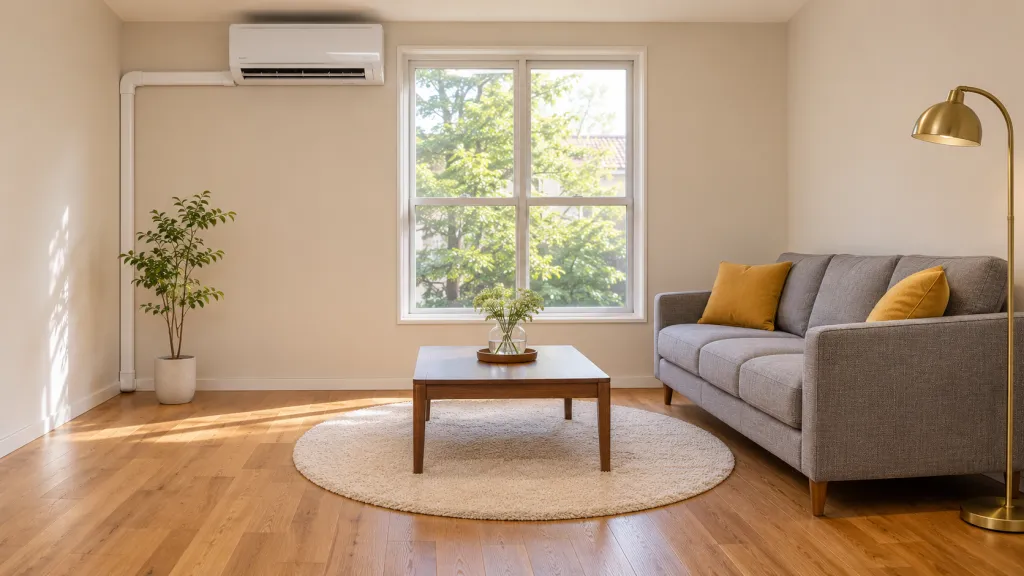
For fair comparisons, test AI photo editing prompts against the same original, not the previous edit. Slide between the images to inspect the target and its surroundings. To combine changes later, approve a single edit and use that approved image as the next reference.
Replace the floor, not the whole palette
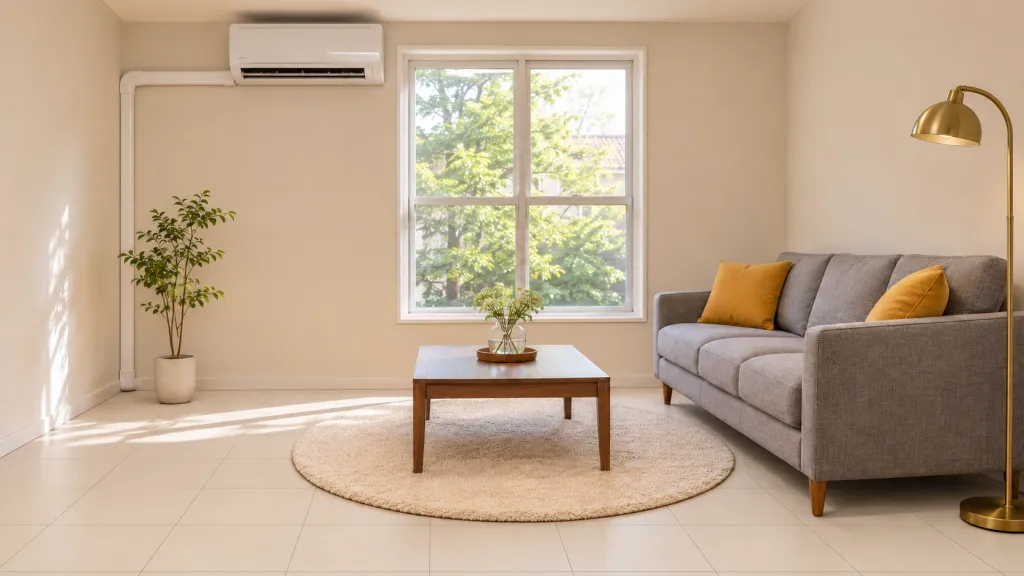
For flooring, AI photo editing prompts should describe the finish and joint scale. A pale surface changes how the room feels without requiring a new wall color or furniture set.
- Change
- Visible oak planks become warm white matte porcelain tile. Adapt the tile size to your own material sample.
- Preserve
- The rug, its shape and position, table legs, baseboards, sofa, walls and window remain as they were.
- Check closely
- Look for tile lines running through the rug, floating furniture legs, distorted joints or a new wall color.
Prompt to adapt
Using the attached original photo, replace ONLY the exposed oak flooring with warm white matte porcelain tiles, approximately 24 × 24 inches, with fine light-gray grout. Keep the rug exactly in place; do not tile over it. Preserve the beige walls, gray sofa, mustard cushions, table, plant, lamp, window and AC pipe cover. Keep the same camera, crop, daylight direction and contact shadows. Output one edited image.
Change wall color without repainting objects
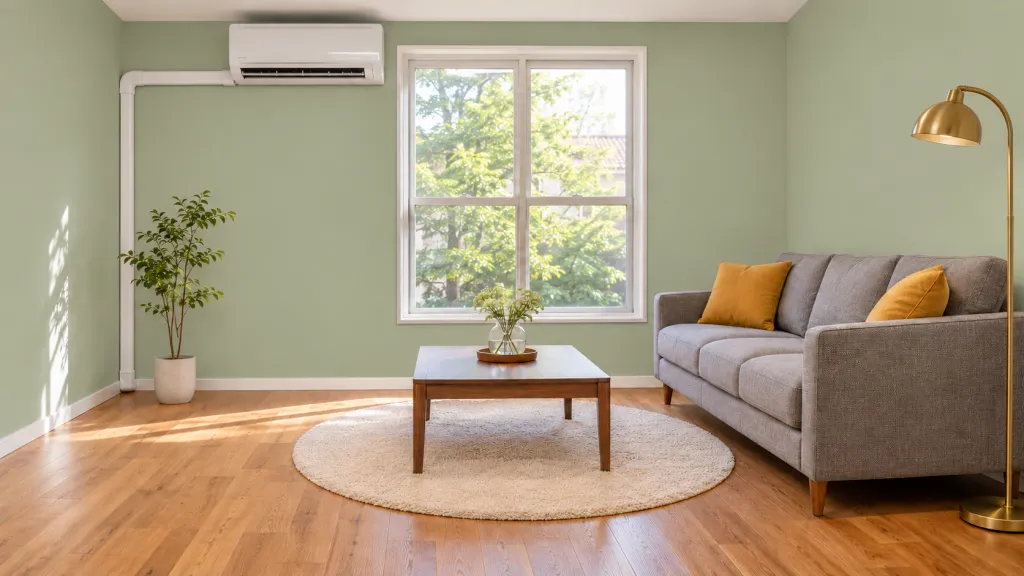
Wall-focused AI photo editing prompts need a boundary. “Make everything sage” is a palette request; “repaint only the painted wall surfaces” excludes the window frame, trim and furniture.
- Change
- The painted wall surfaces become muted sage green with a matte finish.
- Preserve
- White window trim, baseboards, AC housing and pipe cover retain their original color; the floor and sofa stay unchanged.
- Check closely
- Inspect the edges around the plant, window and AC. A paint preview should not tint the outdoor view or upholstery.
Prompt to adapt
Repaint ONLY the painted wall surfaces in this photo a muted pale sage green, matte finish. Keep the white window frame, baseboards, AC unit and pipe cover white. Do not change the oak floor, gray sofa, mustard cushions, rug, table, plant or brass lamp. Preserve all positions, shadows, daylight and the exact camera view. Return one image of the same room.
Change the upholstery, not the sofa model
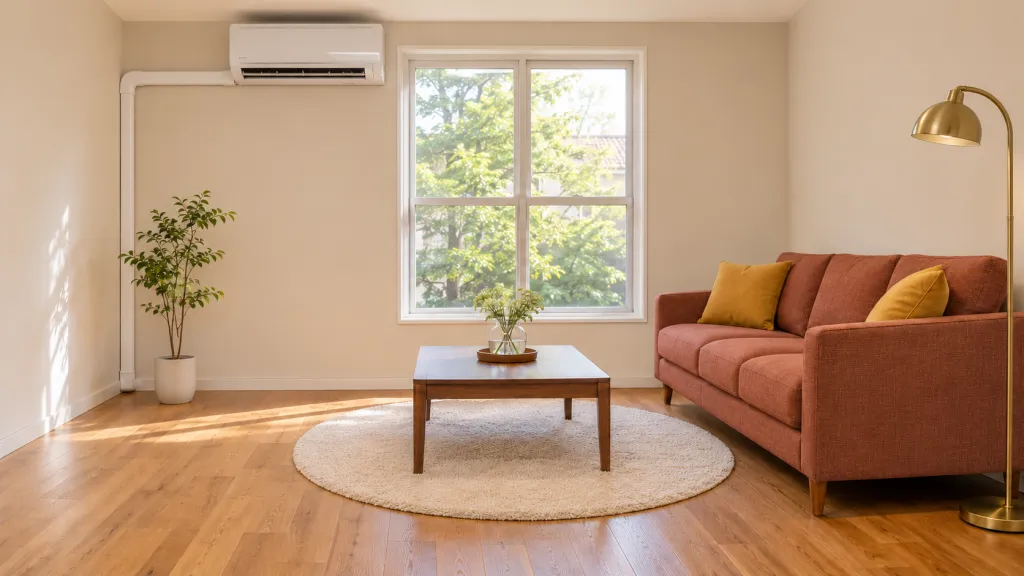
Furniture AI photo editing prompts should separate appearance from shape. If you want to test fabric, say that the sofa's size, silhouette, seat divisions and legs must stay.
- Change
- Gray upholstery becomes muted terracotta linen; the example changes fabric appearance only.
- Preserve
- Sofa dimensions, arms, cushions, legs and position. The two mustard throw pillows are separate objects and remain unchanged.
- Check closely
- Count the seats and pillows. Compare the arm height and the gap between the sofa and table.
Prompt to adapt
Change ONLY the gray sofa upholstery to muted terracotta linen with a subtle woven texture. Keep the identical sofa silhouette, dimensions, arms, seat divisions, legs and position. Keep both mustard throw pillows unchanged. Preserve the room's beige walls, oak floor, rug, table, plant, lamp, window and AC. Match the original framing, perspective and light. Do not add new furniture.
Visualize a pipe cover instead of erasing the pipe
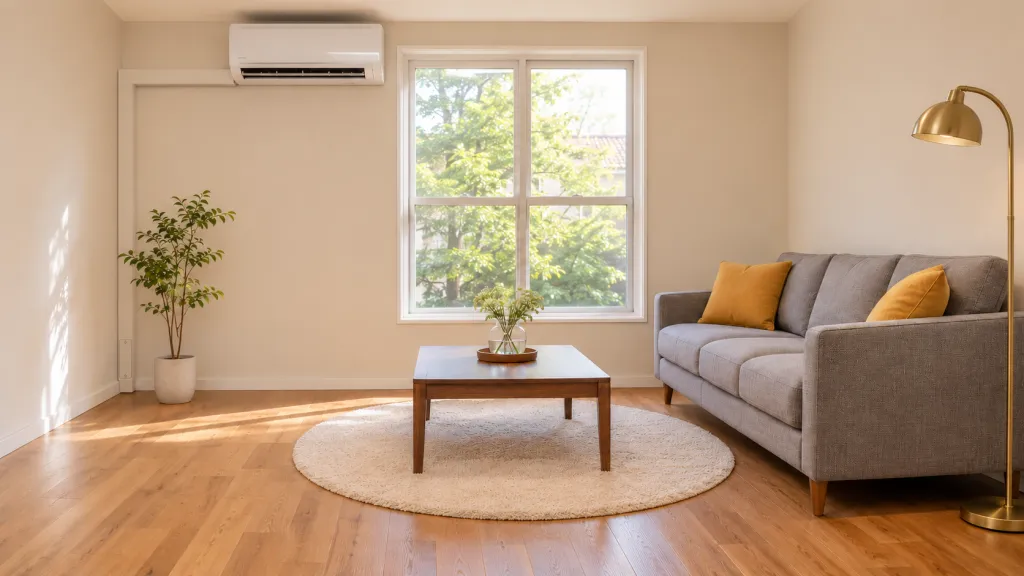
For exposed services, AI photo editing prompts should ask for a covering concept. Removing a pipe from the picture does not explain how it could be concealed in the room.
- Change
- A slim wall-colored boxing follows the existing horizontal and vertical pipe route, with an inspection-panel seam.
- Preserve
- The pipe route and AC location, visible air outlet, window, furniture and remaining wall surfaces.
- Check closely
- The concept must leave the unit unobstructed. Access, ventilation, drainage and clearances still need an installer's review.
Prompt to adapt
Show a visual concept for concealing ONLY the white surface pipe cover in the left corner. Add slim beige boxing that follows its existing L-shaped route, with a discreet removable inspection panel. Keep the AC unit exposed and its outlet unobstructed; do not relocate or erase it. Preserve the window, room geometry, all furniture, floor, lighting and camera. Return one concept image, not a construction drawing.
When AI photo editing prompts change too much
Suppose you requested white tile, but the sofa turned blue and the walls changed color. Do not approve the image because the floor looks good. Identify the unwanted changes before requesting the next version.
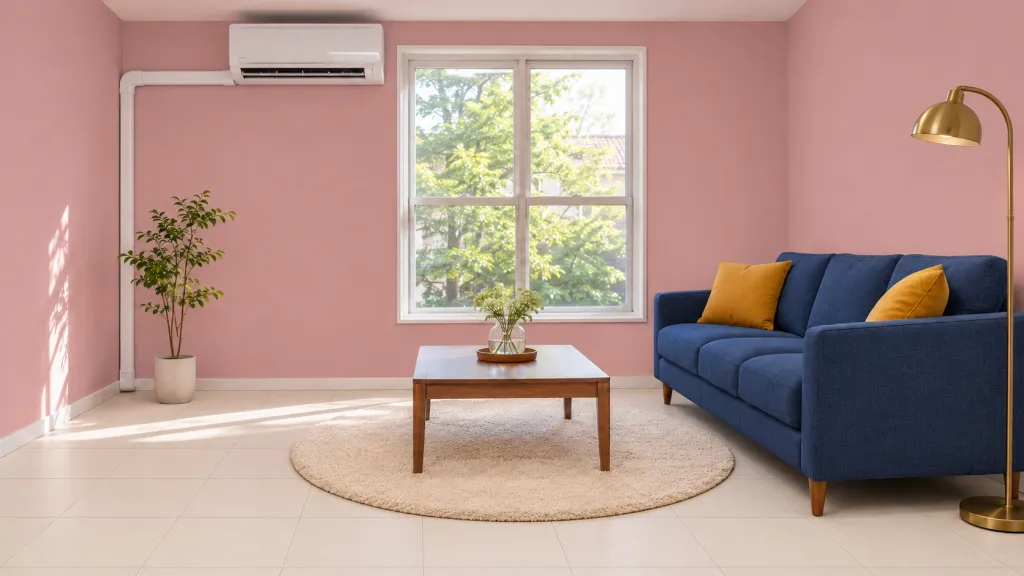
The constructed drift example changes three categories instead of one. The repair target keeps the white tile while restoring the original beige walls and gray sofa. Compare those objects before looking at styling details.
Correction for AI photo editing prompts
The last result changed more than requested: the walls and sofa upholstery are different. Use the ORIGINAL attached photo as the source of truth, not the rejected result. Apply only the warm white matte floor tiles. Restore and preserve the original beige walls, gray sofa, mustard cushions, furniture positions, window, AC and pipe cover. Match the original camera, crop and lighting. Do not introduce any other changes.
If only one small detail drifted, name that detail and restate the approved change. If the camera, window or furniture geometry changed, restart from the original. Avoid repeatedly editing a rejected output: errors can accumulate. Reattach the approved reference when starting a new conversation.
Use AI photo editing prompts in your workflow
- 01
Choose a clear source
Open Agent, attach the room image and state that you want an edited image. Use a sharp, well-lit photo where the target is visible. Save a separate original; a screenshot of a screenshot loses useful detail.
- 02
Submit one bounded edit
Copy a template and replace its materials and preservation list. If the selected model cannot edit images, choose an image-capable option. Review the displayed credit cost before submitting; retries are not assumed to be free.
- 03
Compare, then continue
Compare the original and output at the same size. Check geometry first, materials second. Save the approved result before making another change, and label versions so you know which image a follow-up refers to.
To prepare a redesigned room image from a photo, explore AI Room Design.
Review AI photo editing prompts against the result
- Target: did the requested surface change, with the right finish and scale?
- Boundaries: are rug edges, furniture legs, trim and shadows intact?
- Identity: are windows, room proportions, furniture positions and viewpoint consistent?
- Decision: accept, correct one detail, or restart from the original—before adding another request.
Questions before you generate
Turn one specific change into a useful comparison
Keep the original nearby and make the preservation list as deliberate as the change. Save successful AI photo editing prompts alongside their reference images.