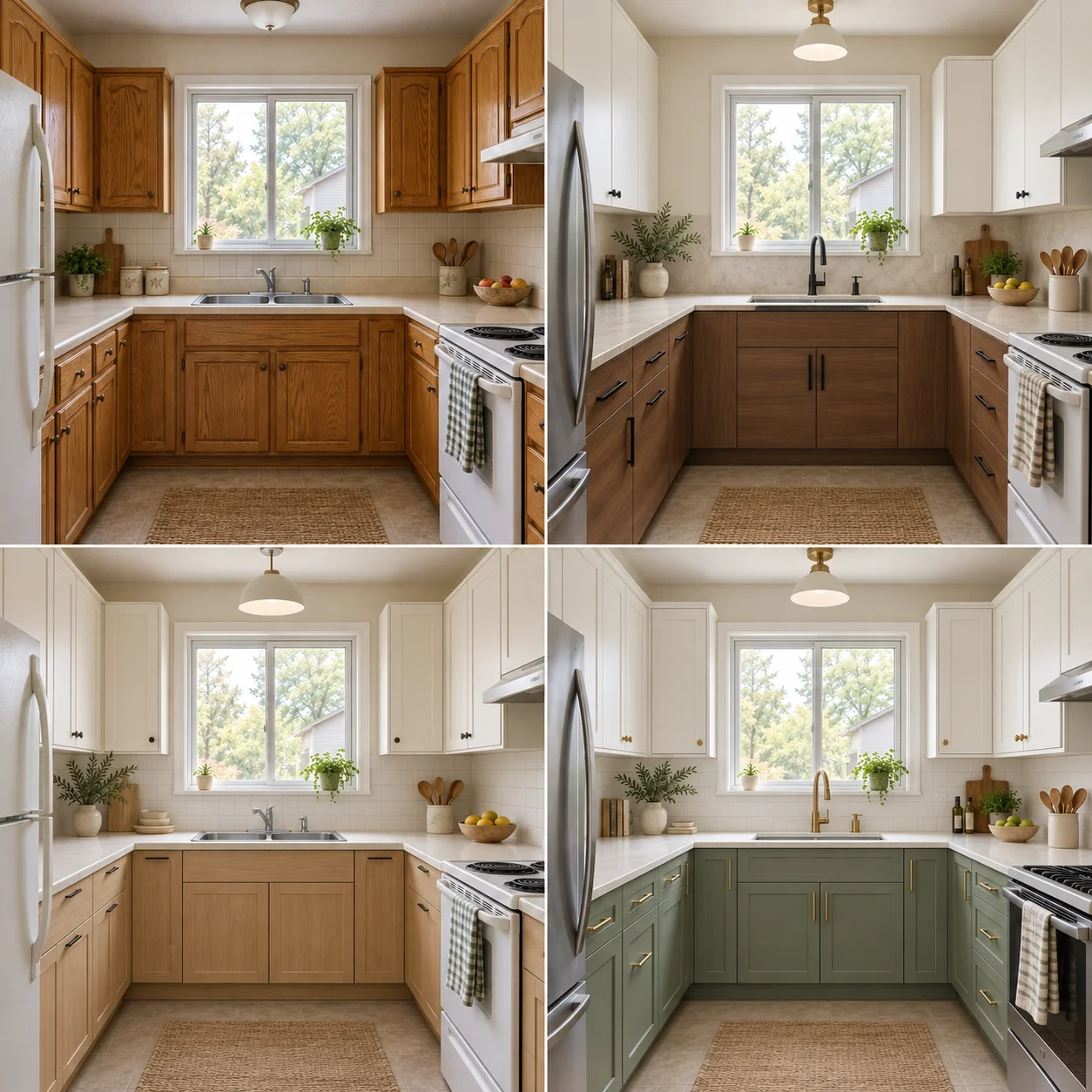
Upload your existing kitchen photo, choose a style and preview a new look. Compare the original kitchen with redesigned cabinets, countertops and finishes before deciding which renovation direction suits your home.
Sign in to receive free credits and try kitchen design. Costs depend on your selected model.
Original Kitchen
After
AI-generated illustration, not a verified tool result.
AI Kitchen Design
One Kitchen. Different Possibilities.
Compare the original kitchen with three style concepts. Notice how cabinet fronts, countertops and lighting change the mood while the window and appliances provide familiar reference points.
Original Kitchen
Warm Modern
Soft Scandinavian
Timeless Shaker
AI-generated illustration, not a verified tool result.
Warm Modern
Flat walnut lower cabinets, white uppers and a pale countertop replace the original oak finish. Black handles add contrast. Compare the darker wood against your kitchen’s daylight. To explore this look, choose a modern direction with warm wood, light stone and simple hardware.
Soft Scandinavian
Light oak, soft white and understated lighting create a softer palette. Compare this option with the walnut concept to see which wood tone suits your room. For a similar result, specify pale wood, a plain backsplash and minimal hardware.
Timeless Shaker
Sage green lower cabinets, white uppers and brass details give this concept a traditional feel. Compare the framed doors with the flat modern cabinets. View the green beside the countertop and backsplash before choosing physical samples for your renovation.
How To Use AI Kitchen Design From A Photo
01
Upload Your Existing Kitchen
Use a clear, well-lit photo that shows the cabinets, countertops and appliances. Keep the camera level and avoid heavy filters.
02
Choose A Style And Describe Priorities
Pick a design direction and explain what matters: lighter cabinets, a warmer finish or a quieter backsplash. Mention features you want to keep.
03
Generate, Compare And Refine
Review the new kitchen image against your original photo. Explore another direction, then use your preferred concept to discuss the renovation.
A Kitchen Photo And Brief That Give AI A Clear Starting Point
Photograph the full cabinet run in daylight with the camera level. Clear temporary clutter. Try this brief: keep the U-shaped layout, window and sink; add light oak cabinets, a white backsplash and pale countertops. Compare the result with your photo.
AI images are visual references, not measured plans. Check appliance clearances, cabinet dimensions, ventilation, plumbing and electrical work with a qualified professional before ordering or building.
Why Choose Our Free AI Kitchen Design Tool
Explore new kitchen looks from your own photo, compare styles in a familiar space and check credit costs before generating. Turn your preferences into visual references for renovation discussions.
AI-generated illustration, not a verified tool result.
01
Design Around Your Own Kitchen
Start with a photo showing the sink, stove, refrigerator and main cabinets together. Compare each result with the original window location, counter shape and appliance positions. An appealing image should still make sense for your room. Keep a measured floor plan for cabinet dimensions and installation decisions.
02
Compare Styles Before Renovating
Be specific: keep the window and sink; try sage green Shaker lower cabinets, white uppers and pale stone countertops. Compare this with light oak and black handles. Change one group of finishes at a time so you can identify what works, then refine any unwanted details.
03
Start With Free Credits After Sign-In
Sign in to receive welcome credits and start designing for free. Choose Basic or Pro when preparing your kitchen concept; the selected model determines the credit cost. Check the displayed amount before generating, then use the same photo to compare your preferred styles.
Free AI Kitchen Design: Credits And Costs
Enjoy free AI kitchen design with welcome credits when you sign in. The included credits are enough to try the tool. Generation costs depend on whether you choose Basic or Pro. Prepare your photo, select a style and model, then review the credit cost before creating your kitchen image.
Seeing my own kitchen with light oak cabinets made the decision much easier. I compared it with the darker option and finally had a clear direction for our cabinet update.
Emma CarterExample: Homeowner Planning A Refresh
The new image helped me see how white cabinets and a quieter backsplash could brighten my small kitchen. I took the concept to our installer to explain the look I wanted.
Daniel BrooksExample: Small-Kitchen Renovation
My partner and I liked different styles until we compared the kitchen images side by side. We agreed on sage green cabinets and could show our designer exactly what we meant.
Yes. Sign in to receive enough welcome credits to try AI kitchen design for free. Each generation uses credits according to your chosen Basic or Pro model. Check the displayed cost before generating.
The best fit depends on your task. For visual ideas, look for photo-based redesign, useful style choices and clear costs. For dimensioned layouts, cabinet orders or installation drawings, use a measured planning workflow and professional review.
A clear photo provides a starting point for exploring a new look. Hidden corners and exact dimensions cannot be reliably inferred, so check every concept against your real kitchen.
Not necessarily. State which windows, doors and appliances should stay, then inspect the result. AI can change proportions and details even when you ask to preserve them.
Use successive concepts to explore different palettes, cabinet finishes and overall styles. Treat colors as a visual direction and check physical samples in your own lighting.